Mobile PDF Scanner that doubles as a local document hub
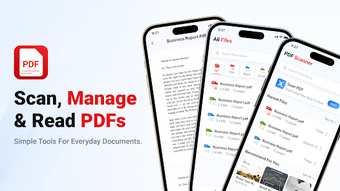
Experience a compact scanning and file-management tool with PDF Scanner: Documents & Files by WW Soft, designed to digitize physical paperwork on Android devices. The app captures documents using the phone camera and supports specialized modes for Word and PowerPoint materials, while offering a centralized browser and a Recent Files dashboard. Students, office workers, and small business owners gain quick access to recent scans and local documents, plus encrypted transit for data protection.
What the app does and how it fits mobile workflows
PDF Scanner acts as a portable document scanner and a local file manager, converting paper receipts, forms, and letters into PDF using the device camera. The tool includes specific handling for office-style pages, which supports scanning of Word and presentation material. Its combined scanning and browsing model reduces the need to switch between separate camera and file apps when working on short, on-the-go digitization tasks.
How it affects device resources during routine use
The app is described as optimized for modern Android devices, suggesting typical runs are suited to current phones. In practice, scanning and local browsing are tasks that primarily use camera capture and storage I/O rather than sustained CPU load; therefore the app targets mobile sessions rather than prolonged desktop-style processing. This makes it appropriate for quick capture and retrieval while away from a computer.
Safety and data handling in transit and storage
Data encryption in transit is explicitly stated, and the developer declares no third-party data sharing. Those points indicate encrypted upload or transfer paths and a privacy posture that avoids external data distribution. Users who must protect scanned documents during transfer to cloud or remote recipients can rely on the presence of encrypted transit and an asserted no-sharing practice.
Interface choices and who needs technical knowledge
The app emphasizes a Recent Files dashboard plus an All Files browser that centralizes local documents. That Recent-First workflow targets users who need fast retrieval without deep navigation. Casual users can operate with minimal setup by tapping recent items, while people handling varied office documents can use specific scan modes for structured materials; advanced configuration does not appear required for everyday scanning tasks.
Practical choice for mobile scanning with one notable trade-off
PDF Scanner: Documents & Files is a practical option for students and small office users who need quick mobile digitization plus local document access, supported by encrypted transit and a recent-first interface. One caveat is the presence of an in‑app recommended content channel, which may surface suggestions that distract from strictly local document operations. For focused mobile capture and retrieval, the app performs reliably for routine tasks.